Table of Contents
Key takeaways
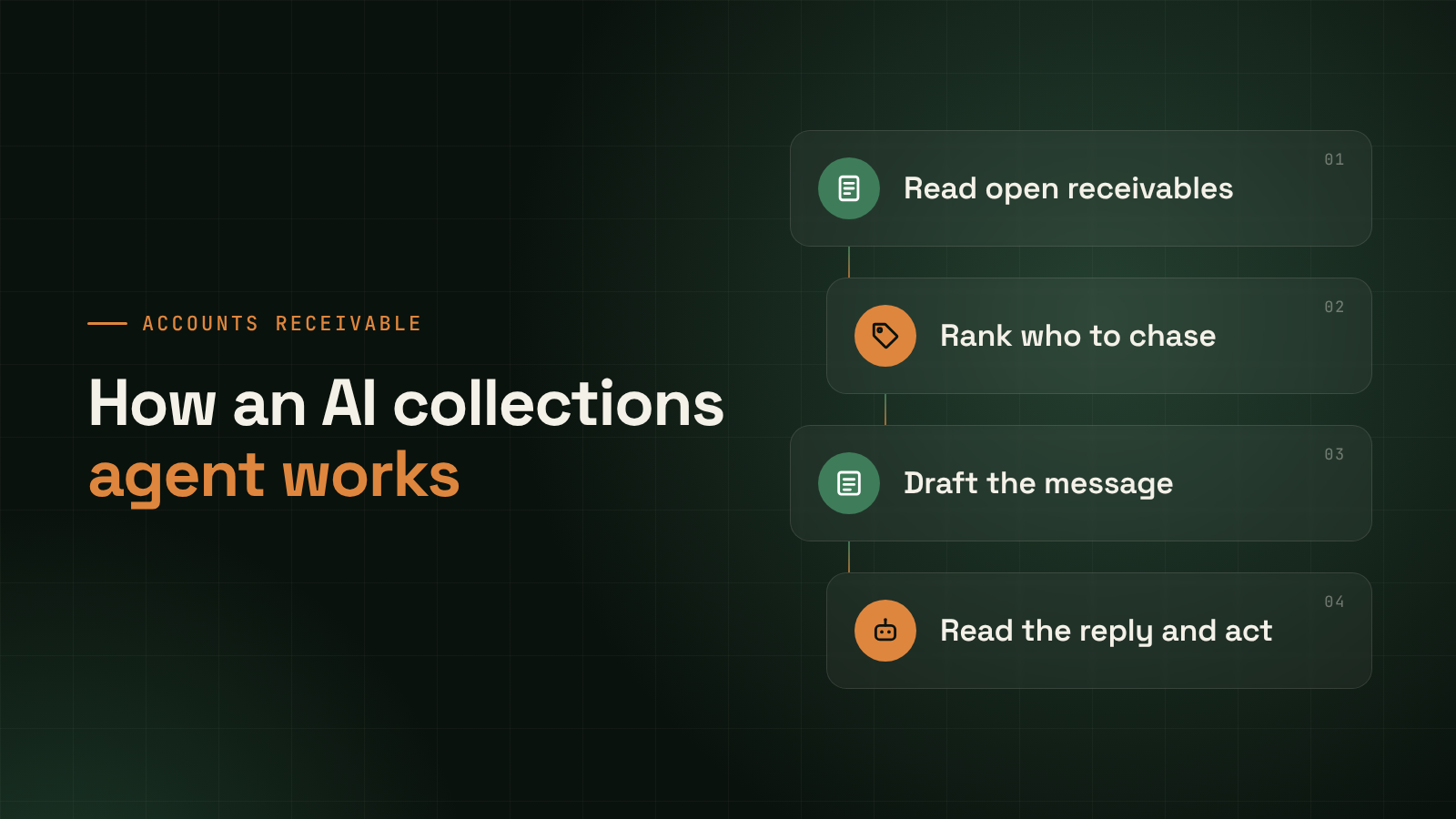
An AI collections agent reads your open receivables from the ERP, ranks accounts by what is at risk, drafts the follow-up in your tone, then reads the reply and acts on what it says.
The reply is the part that matters. A reminder tool stops at send. Most of the work in collections happens after the customer answers, and that is where manual teams lose days.
It does not decide who gets chased harder, approve credit holds or release messages outside your approved pattern. Escalation policy stays with finance.
SAP Business One gives you a Dunning Wizard that produces letters. S/4HANA Collections Management adds a worklist, promises to pay and contact records. Neither reads an inbox.
Expect the first visible change to be coverage, not DSO. More of your overdue ledger ends up in a live conversation before the aging number moves.
Imagine you run credit control at a mid-market packaging manufacturer in Toronto. Your ledger shows $480,000 overdue across 180 accounts, and two people to work it. Reminders go out on the days someone has an hour. Replies land in a shared mailbox: a promise here, a disputed short-supply there, three remittance advices nobody matched. By Friday you can describe the week but not forecast the month. An AI collections agent is software that reads your open receivables from your ERP, decides who to contact, drafts and sends the follow-up under your approval rules, and then reads the customer’s reply and acts on it. That last step is what separates it from the reminder scheduler you already have. What the agent reads, writes and escalates inside your system is set out on accounts receivable automation.
What does an AI collections agent do, step by step?
An AI collections agent reads open receivables from your ERP, ranks accounts by how urgent they are, drafts follow-ups for your team’s approval, reads the replies, updates the record, and writes the outcome back to the ERP. It works inside a collections policy your team sets, and it hands anything outside that policy to a person.
It runs a loop. Read the open receivables from the ERP, rank the accounts by value at risk and history, draft a message for each at the right escalation level, send it under your approval rules, read the reply, then write the outcome back as a promise, a dispute or an escalation. The loop repeats daily.
Six steps, and five of them exist in most collections teams already. The sixth, reading the reply and acting on it, is the one that gets skipped when the team is busy, and skipping it is why ledgers stall. A customer who answers and hears nothing back for nine days learns how closely you are watching.
What does the agent read from your ERP before it chases anyone?
Open invoices with dates and amounts, payment terms, credit limits, the aging bucket, unapplied receipts and credit notes, the contact on the account, and the history of what was sent and what was promised. Without the last two, it is a mail merge rather than a collections agent.
The unapplied cash matters more than teams expect. A sizable share of what looks overdue is money already received and sitting against the wrong invoice, or a credit note nobody applied. Chasing those accounts loses you credibility with a good customer in one email. The agent checks applied cash before it drafts anything, which is why receipt matching and collections belong next to each other; SAP Business One bank reconciliation covers that side of it.
How does it decide who to chase first?
By exposure and behavior, not by how far down the aging report an account sits. Value at risk, days past due, whether a promise was given and broken, whether a dispute is open, and how this customer has historically paid. The output is a worked list for today, not a statement run for everyone.
| Signal | What it changes |
|---|---|
| Value at risk | A $43,000 account at 20 days past due outranks a $450 account at 90 days |
| Broken promise on file | Moves to the top of the queue, with a different message than a first reminder |
| Open dispute | Routes to the person who can resolve the dispute, not to another payment reminder |
| Historical payment pattern | A customer who always pays at day 52 on 45-day terms needs a different cadence than one who usually pays on time and has gone quiet |
| Unapplied cash on the account | Removed from the chase list until the receipt is matched |
SAP’s Collections Management in S/4HANA works on the same principle: its Process Collections Worklist app builds a prioritized list of the most urgent customers, using factors such as the highest overdue amounts and receivables overdue the longest. The difference an agent makes is not the priority list. It is that the list gets worked every day rather than when someone has capacity.
What does it actually send, and who approves it?
Your templates, your escalation levels, your tone, to the contacts on the account. Nothing goes out in a pattern your team has not approved. Most mid-market teams run it with a review queue for the first few weeks, then narrow approval to higher-value accounts and anything outside the standard ladder.
Three settings decide how the agent behaves on a bad day. Which accounts are in scope at all: strategic customers and anything in a live commercial negotiation usually sit outside it. The escalation ladder: what the second and third contacts say, and who gets copied. The stop rule: what makes the agent put an account down and hand it to a person. A sharp reply from a long-standing dealer should trip that rule every time.
What happens when the customer replies?
The agent reads the reply, classifies it, and takes the matching action. A promise becomes a dated promise record against the specific invoices. A dispute is routed, not answered with another reminder. A remittance advice becomes a matching instruction. Anything ambiguous or hostile goes to a person.
Most replies fall into eight types, and each type has a different next step: a dated promise is logged and reviewed, a dispute is routed to the owner, and an angry or legal reply goes straight to a person.
| Reply type | What the agent does |
|---|---|
| Promise to pay with a date | Writes a promise record against the named invoices, sets the review date, suppresses further reminders until then |
| Promise with no date | Replies asking for a date, because an undated promise is not trackable |
| Part payment offer | Records the amount and date offered, flags the shortfall for a decision |
| Dispute or short supply claim | Routes to the dispute owner with the invoice and the customer’s words attached; pauses the dunning cadence on those invoices |
| Remittance advice | Passes the payment reference and invoice list to cash application for matching |
| Wrong contact, person left | Updates the contact, asks for the correct payables contact, retries |
| Out of office | Reschedules rather than counting as a contact |
| Angry, legal or relationship-sensitive | Stops and escalates to a named person with the full thread |
The promise path is what pays for the system. A promise captured from a reply, with its date and its invoices, can be reviewed, chased when broken and counted as forecast cash. The mechanics of that queue are in how do you track promises to pay, and the definition of a real commitment versus a brush-off is in what is promise to pay in collections.
How is this different from dunning in SAP or a reminder tool?
Dunning is scheduled outbound. The agent is a loop that closes. SAP Business One’s Dunning Wizard produces a recommendation report and dunning letters, and can post interest and fees as service invoices. It does what it says well. It does not read the mailbox those letters are answered in.
| Capability | SAP B1 Dunning Wizard | S/4HANA Collections Management | Reminder or sequence tool | AI collections agent |
|---|---|---|---|---|
| Sends reminders on a schedule | Yes, as dunning runs and letters | Yes, via the worklist process | Yes | Yes |
| Prioritizes a daily worklist | No | Yes, by overdue amount and age | Usually by aging bucket only | Yes, by exposure and behavior |
| Holds promises to pay | No | Yes, one promise per invoice, confirmed or not | Rarely | Yes, against the named invoices |
| Reads and classifies replies | No | No, contacts are documented by the specialist | No | Yes |
| Routes disputes away from the cadence | No | Yes, through dispute cases, once a person logs them | No | Yes, from the reply itself |
| Writes back into the ERP | Yes, letters and fee invoices | Yes, native | Usually not | Yes |
If you run S/4HANA Collections Management properly configured, you already have the structure: a worklist, promises to pay (SAP’s documentation notes each promise is assigned to exactly one invoice, and that only one unconfirmed promise can exist at a time), contact records and resubmission dates. What you still need is a person to read every reply and keep it current. That is the gap an agent fills. On SAP Business One the gap is wider, because the Dunning Wizard was never designed to hold a conversation.
What does it write back into your ERP?
Promises with dates and invoice links, contact and activity records, dispute flags, updated contact details, and the escalation status of each account. Nothing financial. It does not post journals, apply cash, issue credit notes or change credit limits.
That boundary is usually the first thing a CIO tests. The agent writes collections context, which is reversible and auditable. Financial postings stay with the controls you already have. Every write carries who or what made it, when, and the message it came from, which is what an auditor asks for. The wider control model is in AI agent governance: approvals, audit trails and human-in-the-loop controls, and data handling is on the security page.
What changes in the first 90 days?
A typical sequence, offered as an example rather than a result: in the first weeks the goal is coverage, so every overdue account has an owner and a next step; then cash timing, such as chasing broken promises in days rather than weeks; and DSO last, because it moves slowest.
Coverage first, then cash, then DSO. In the early weeks more of your overdue ledger ends up in an active conversation with a dated commitment attached. Cash timing improves next, as broken promises get chased in two days instead of two weeks. DSO moves last, because it is an average over a quarter.
Teams that measure only DSO in month one conclude nothing is happening. Watch the operating numbers instead: what share of the overdue balance carries a live promise, how many days pass between a broken promise and the chase, how many disputes surfaced that nobody had logged, and how much promised cash arrived. The sequencing of all four, and how to segment an overdue ledger first, is covered in cutting DSO with AI receivables agents.
What this doesn’t do
It does not set collections policy. Escalation thresholds, credit holds and the decision to stop shipping stay with finance and sales. The agent applies the ladder you wrote.
It does not send outside the approved pattern. Anything that does not fit an approved template and escalation level goes to a person instead of being improvised.
It does not resolve disputes. It identifies and routes them with evidence. A short-supply claim still needs someone from operations to check the dispatch.
It does not apply cash or post financial documents. Receipt matching, credit notes and journals stay inside your existing finance controls.
It does not judge creditworthiness. A falling kept rate is a signal for a credit review, not a verdict on the customer.
It does not replace the relationship call. When a long-standing dealer is under real pressure, the right next step is two people who know each other talking. The agent’s job is to tell you that call is due.
Frequently asked questions
Does an AI collections agent email customers without approval?
Not unless you configure it that way. Standard practice for mid-market deployments is a review queue at launch, then narrowing approval to high-value accounts, non-standard messages and anything the agent flags as sensitive. The approval rules are yours to set and change, and every message sent is logged against the account.
How is an AI collections agent different from automated payment reminders?
A reminder tool measures your activity: how many messages went out, on what schedule. An agent measures the customer’s response: what they committed to, what they disputed, what they paid. The reply handling is the difference, and it is where most of the recovered cash comes from.
Does it work with SAP Business One or only S/4HANA?
Both. On SAP Business One it reads open items, aging and contacts and writes promises and activity back, which fills a genuine gap, since the Dunning Wizard produces letters but does not track replies. On S/4HANA it works alongside Collections Management rather than replacing the configuration you already have.
How accurate is it at reading replies?
We do not quote a single accuracy figure, because it depends on the customer’s replies and the ERP data. The agent reads each reply with a confidence level; replies it is unsure about go to a person, and a sample of its readings is reviewed regularly so errors are caught early.
Will customers know they are dealing with an AI?
That is your decision, and it should be a deliberate one. Messages go out in your company’s name, from your addresses, in the tone your team approved. Many mid-market teams prefer that routine chasing reads as the finance team, with escalations clearly handled by a named person.
How long does it take to go live?
The dependencies are ERP access, agreement on which accounts are in scope, and a written escalation ladder. The third delays most projects, because many teams discover they have never written their collections policy down, only practiced it.
Does it handle customers who pay in part or against multiple invoices?
Yes, provided it can see applied cash. A part payment is recorded against the promise with the shortfall flagged, and a payment covering several invoices is passed to cash application with the remittance detail. Getting receipts onto the right invoices remains a reconciliation job, not a collections one.
Where to go next
To see how the collections agent reads your receivables, drafts the chase and handles the reply inside your ERP, start with accounts receivable automation. Three related reads:
Cutting DSO with AI receivables agents puts this loop inside a full operating model and shows how to segment an overdue ledger before automating anything.
How do you track promises to pay covers the review queue, the status model and what to do when a promise breaks.
AI agent governance: approvals, audit trails and human-in-the-loop controls answers the control questions a CIO will raise once an agent is messaging customers and writing to the ledger.
A note on sourcing, checked October 30, 2026: the SAP Business One Dunning Wizard description comes from SAP’s own product help on help.sap.com, which documents the wizard’s run statuses, recommendation report, dunning letters and the service invoices it can post for interest and fees, and says nothing about tracking replies or promises. The S/4HANA Collections Management details, the prioritized worklist, promises to pay assigned to exactly one invoice with only one unconfirmed promise permitted, customer contact records and resubmission dates, come from SAP’s own learning documentation for the collections specialist process. No accuracy rate, DSO benchmark, recovery percentage or time-saving figure is quoted here, because no first-hand authoritative source publishes one for mid-market B2B collections. The opening scenario and all dollar figures are illustrative. Nothing here is legal advice on debt recovery.