Table of Contents
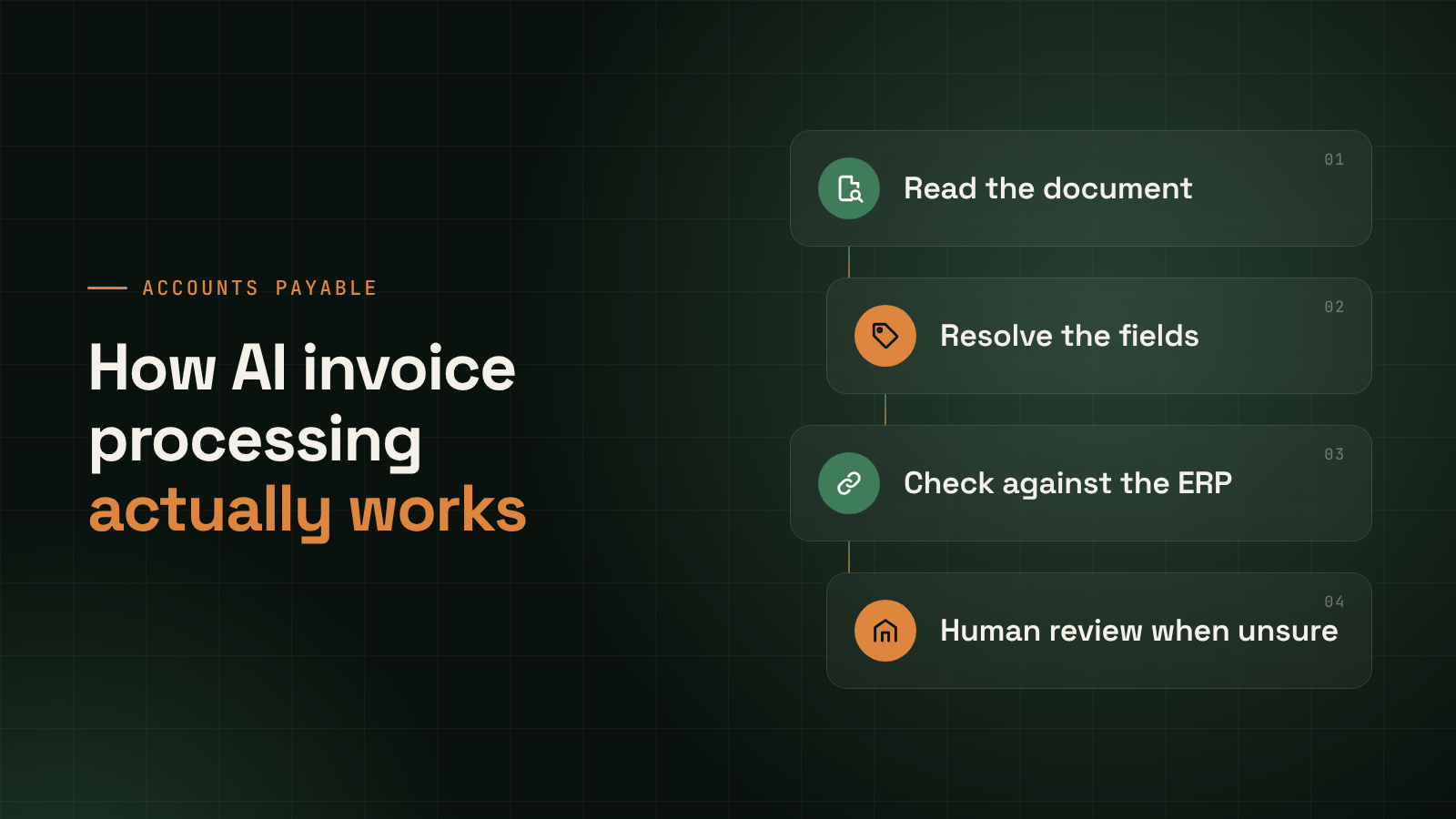
AI invoice processing turns a supplier PDF into a checked, staged document in your ERP in four steps: it reads the invoice, resolves each field to your master data, checks it against the PO and goods receipt, and sends it to a person when it is unsure. This guide is written for the finance leader who signs off on a deployment.
Key Takeaways
- AI invoice processing is four distinct jobs, not one: reading the document, resolving what the fields mean, checking them against your ERP, and deciding whether a human needs to look.
- The hard part is not reading the PDF. It is resolving a supplier’s description of “MS Plate 10mm” to the right material code in your item master.
- Confidence scoring is the whole design. An invoice the system is unsure about should stop and wait, not post and hope.
- Nothing posts to your ERP under an authority the system invented. Posting rights, approval limits and payment release stay exactly where your controls put them.
- Every country adds its own layer: tax ID validation, tax codes, withholding rules and e-invoicing formats. A system that only knows one jurisdiction’s rules will struggle the moment a supplier from another one arrives.
Most explanations of AI invoice processing are written for engineers or for buyers who have already decided. This one is written for the person who has to sign off on it: a finance leader who wants to know what happens between a supplier’s PDF landing in a mailbox and a document appearing in SAP, and which of those steps they should not trust to software.
So: how does AI invoice processing work? In plain terms, it is a sequence of four jobs, and it is worth separating them because vendors who are weak at one usually talk loudly about another.
How does AI invoice processing work, start to finish?
AI invoice processing works in four stages: it reads the document, resolves the extracted fields to ERP records, runs AP checks such as PO match, tax and duplicate detection, and then either queues the invoice or escalates it with its reasoning. Each stage can fail in a different way, so each needs its own test.
An invoice arrives by email, portal or scan. The system reads the document and pulls out fields. It then resolves those raw fields into things your ERP recognizes: a supplier code, a purchase order, a material code, a tax treatment. It matches the invoice against the PO and the goods receipt. Finally it scores its own confidence and either queues the document for posting or routes it to a person.
Each of those four stages fails differently, which is why it is worth walking them individually.
Stage one: how does the system read the invoice?
Modern invoice capture does not use a template per supplier. It reads the document the way a person does: locating the invoice number by what surrounds it, not by its coordinates on the page. That is the difference that matters, because templates are what break when a supplier changes their letterhead.
Older capture tools were trained per layout. You taught the system that on Supplier A’s invoice, the invoice number sits 40mm from the top-left. That works beautifully for your twenty largest suppliers and collapses on the other three hundred, which, in most mid-market businesses, is where the volume and the manual effort actually sit.
A model-based reader works from context instead. It learns what an invoice number looks like in general: a short alphanumeric string, usually near a date, usually labeled with one of a few dozen variants of the word “invoice”. It handles a scanned copy, a rotated page, a supplier who puts the tax registration number in the footer, and a handwritten annotation in the margin: imperfectly, but without needing to be taught that supplier individually.
What it still struggles with: genuinely poor scans, multi-page annexures where line items run across pages, and documents where the commercial meaning is in free text rather than in a table.
Stage two: what does “field resolution” actually mean?
Field resolution turns text from the invoice into ERP references: a supplier name becomes a vendor code, an item description becomes a material master entry, and a PO number becomes an open purchase order. It requires reading your master data, which is what separates an invoice agent from a capture tool.
Reading gives you strings. Resolution turns strings into references your ERP can act on. “Hartwell Industries” has to become supplier code V-10847. “MS Plate 10mm IS2062” has to become the right item in your material master. “PO 4500012345” has to become an open purchase order with remaining quantity.
This is the stage people underestimate, and it is where most of the real work sits.
Consider a single line on a steel supplier’s invoice: MS Plate 10mm IS2062 Gr.B, 2.4 MT. Your item master may hold that as RM-PLT-10-2062B, with a description that reads nothing like the supplier’s. Your PO may be in kilograms where the invoice is in metric tons. The supplier may have registrations in several states or countries, and the invoice may carry the tax ID you do not have on file.
Resolving that correctly requires reading your master data, not just the invoice. A system that only reads documents will hand you a tidy-looking extraction that still needs a human to map every line. That is the gap between a capture tool and an accounts payable agent.
Stage three: how does it check the invoice against the ERP?
Once fields resolve to ERP references, the system runs the checks your AP clerk would run. PO exists and is open, quantity invoiced does not exceed quantity received on the GRN, rate matches the PO rate within tolerance, tax is calculated correctly, and this invoice number has not already been booked against this supplier.
The check list is longer than the generic vendor templates assume, and the extra rows depend on where you and your suppliers operate:
| Check | What it compares | Why it matters |
|---|---|---|
| PO-GRN-invoice match | Quantity and rate across three documents | Universal, but receipt timing is usually the breakpoint |
| Supplier tax ID validation | Tax registration number on the invoice vs your vendor master and the place of supply | A wrong registration number can mean the input tax credit or VAT recovery does not reach you |
| Tax code and rate | Tax code and applied rate vs the material master | Rate errors are common and surface months later in reconciliation |
| Tax split or treatment | Supply type vs billing and shipping locations (domestic, cross-border, reverse charge) | A mis-applied treatment is a recovery problem, not a rounding problem |
| Withholding tax | Applicability, rate and threshold against the vendor and the expense type | Many generic AP products do not model this well |
| E-invoice validity | Presence and validity of the government-issued identifier or structured file where the supplier is covered by a mandate | Mandates keep spreading, and a covered invoice that fails validation may not be valid at all |
| Reporting or submission window | Invoice date against any local deadline for reporting or clearing | Some regimes set a fixed window, so check yours |
| Duplicate detection | Invoice number, supplier, amount, date proximity | Universal, but weak master data makes near-duplicates harder |
E-invoicing mandates matter here because they change what “trust the document” means. Where a supplier is covered by a clearance or structured-invoice regime, the invoice carries data that a tax authority or network has already authenticated, so the header data is reliable and the useful check is whether it matches your PO. Where a supplier is outside any mandate, you are back to reading a PDF they produced themselves.
Stage four: how does it decide what to escalate?
The system gives each field a confidence score and stops at the first one it is not sure of: it posts only what it is confident about and shows a person the rest, with its reasoning and the source document. When you evaluate a vendor, ask about the quality of the exception queue, not just headline accuracy.
Every extracted field carries a confidence score, and the design question is what the system does with a low one. A well-built agent treats low confidence as a reason to stop. It posts what it is sure about, and it puts everything else in front of a person with its working shown: this is the field, this is what I read, this is why I am unsure, here is the source document.
That last part is what separates a usable exception queue from an unusable one. “Invoice 7741 needs review” tells your AP lead nothing. “Line 3 quantity reads 2.4 MT, PO 4500012345 is in KG and shows 2,400 KG received: confirm unit conversion” lets them clear it in ten seconds.
The practical consequence is that you should ask a vendor about their exception queue, not their accuracy rate. Accuracy on clean invoices is table stakes. What distinguishes systems is how intelligible they are when they are wrong.
What this does not do
This is the section most vendors leave out, so here it is plainly.
It does not release payments. Reading, matching and proposing a posting are not the same as moving money. Payment release stays a human act, inside your existing approval matrix and banking controls.
It does not invent authority. The agent posts under a service user with defined rights in your ERP. If that user cannot post above a value, neither can the agent. Your approval workflow does not change because the document arrived through a different door.
If your item master has four entries for the same plate and your vendor master has duplicates with different tax IDs, resolution accuracy drops and your exception queue grows. Automation makes master data quality visible; it does not substitute for it.
It does not clear everything. Expect a meaningful share of invoices to route to a person: more in the first weeks, fewer as the system sees more of your supplier base. A vendor promising near-total touchless processing from day one is describing a demo, not a deployment.
Correctly booked invoices still have to agree with your tax filings, supplier statements and your books. That is a separate job.
Frequently asked questions
How does AI invoice processing work in simple terms?
It runs four steps. It reads the invoice document and extracts fields; resolves those fields to records in your ERP (supplier code, purchase order, material code, tax treatment); checks the invoice against the PO and goods receipt; then scores its own confidence and either queues the document for posting or sends it to a person to review.
Is AI invoice processing the same as OCR?
No. OCR converts an image into text. AI invoice processing adds the harder steps: working out which piece of text is the invoice number, resolving a supplier’s item description to your material master, and validating the result against your ERP. Most template-based OCR tools stop at extraction and hand the mapping back to you.
How accurate is AI invoice data extraction?
Accuracy varies by field and by document quality, and any single headline number should be treated skeptically. Header fields like invoice number, date and total are consistently easier than line-level item resolution against your master data. The more useful question to ask a vendor is what happens to the invoices the system gets wrong: whether it flags them with its reasoning, or posts them silently.
Can AI invoice processing post directly into SAP?
It can, under a service user with defined posting rights, and within your existing approval limits. What it should not do is release payment. Posting a document and authorizing money to leave the business are separate acts, and the second one stays with a person.
Does it handle local tax and e-invoicing requirements?
It has to, to be useful. That means validating the supplier tax ID against your master and the place of supply, checking tax codes and applied rates, getting the tax treatment right for domestic and cross-border supplies, applying withholding rules where they exist, and verifying the e-invoice identifier or file where the supplier is covered by a mandate. Ask any vendor which countries’ rules it has actually been configured for, and see it work on your own suppliers.
How long does it take to see results?
Expect the exception rate to be high in the first few weeks and to fall as the system sees more of your supplier base and your master data gets cleaned up in the process. Teams with tidy vendor and item masters reach a steady state considerably faster. Treat any vendor promising touchless processing from week one as describing a demo.
Will it replace our accounts payable team?
It changes what the team spends its day on rather than removing the need for one. Data entry and matching shrink; exception handling, supplier queries, master data quality and controls do not. The roles that disappear are tasks, not people, though headcount planning is your decision, not the software’s.
Where to go next
If you want the commercial view of this, what it costs, what it integrates with and what a deployment looks like in an SAP environment, start with AI invoice processing.
Related reading:
- Three-way matching automation: closing the gap between PO, invoice and receipt: the matching stage in detail, including the exceptions rules engines leave behind.
- AI accounts payable agents: what actually changes in your invoice workflow: the end-to-end AP workflow and the steps that stay with your team.
- AI agent governance: approvals, audit trails and human-in-the-loop controls: how agent actions are classified, authorized and evidenced for audit.